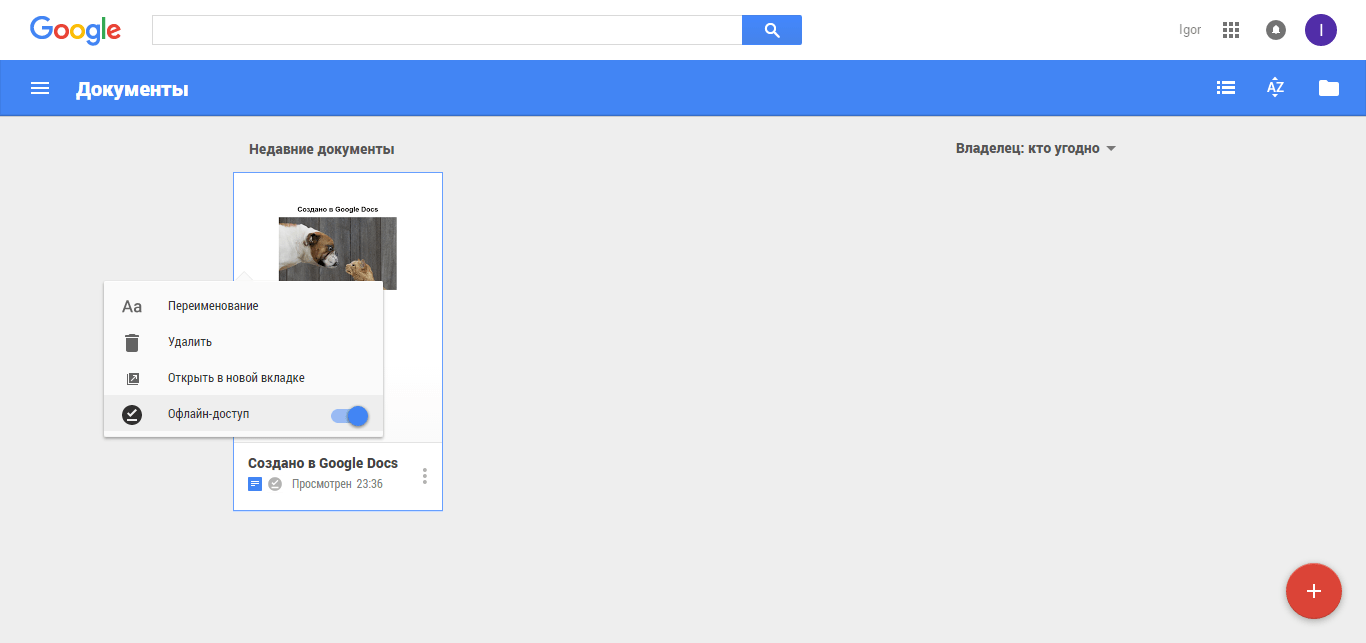
Лично мне очень нравится Google Docs. Попробую описать его возможности. Google Docs позволяет работать в Offline-режиме. Об этом можно почитать здесь. В Offline-режиме можно также создавать документы - после подключения интернета созданный документ будет загружен на диск, откуда его можно будет скачать в различных форматах, например, в docx, pdf, epub. Для удобства я создал ярлык на рабочем столе - если на него кликнуть, откроется браузер с моими документами - я могу их редактировать и создавать новые. Скачать ярлык.
Включение Offline-доступа
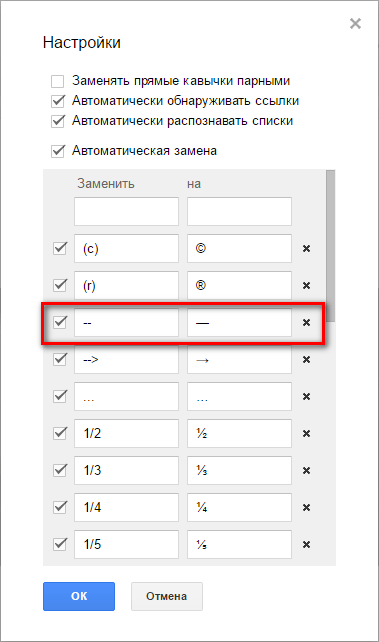
В меню "Инструменты" Можно настроить правила автозамены. Я, например, задал замену двойного дефиса на тире:
Какой-нибудь офисный пакет на компьютере, конечно, всё-же должен быть установлен, иначе для просмотра документов находящихся на компьютере, придётся сначала загружать их на Google-диск. В качестве лёгкой и бесплатной альтернативы можно воспользоваться офисным пакетом SoftMaker FreeOffice (можно установить не все компоненты).
Дополнения для Google Docs
Для установки дополнений выбрать "Дополнения" → "Установить дополнения". Для удаления дополнений выбрать "Дополнения" → "Настроить дополнения" → "Настроить" → "Удалить".
- Text Factory
One click to insert date/time or timestamp, add parentheses, add thousands separators, and convert between half / fullfwidth form
Install the Text Factory, then you can simply insert date/time or timestamp from the pulldown menu directly. For the selected text, you can add parentheses , add thousands separators to numbers, convert alphabetic case, and do characters conversion between half and full width form by mouse click on the buttons in sidebar. You can customize the date/time format to conform your culture convention.
Install the Text Factory, then you would find that writing manual, personal diary and daily working digest is quite timesaving and happy tasks.
2016-2-27: New feature: the leading zero will be removed by prefixing * to the existing format. - TableFormatter см. также здесь.
- Allow to create custom table style
- Allow to change row/column colors
- Allow to customize border size
- Doc Tools
A set of single-click tools to change case, highlight text, sort tables and lists, spell numbers, and more.
This add-on gives you thirteen straightforward tools that take on all minor adjustments in your document. One click will make your text look the way you need:- Make your text bigger or smaller until you find the right size with the “Increase font” and “Decrease font” tools.
- There is an icon to quickly capitalize each sentence, toggle case, change it to uppercase or lowercase, and to start each word with a capital letter.
- Highlight important information and use the possibility to remove any particular color from the selection.
- Arrange your table rows, list items, or even headings with all their text in alphabetical order. When working with tables you can sort by any combination of columns.
- One click in the sidebar will convert the selected words to integers, or spell numbers.
If you have any questions about the add-on, please post them in our community: http://goo.gl/5aqwsD
Редакторы Яндекс-диска и Mail.ru очень напоминают Microsoft Word и тоже удобны. К сожалению, в них можно только редактировать документы, но не создавать.